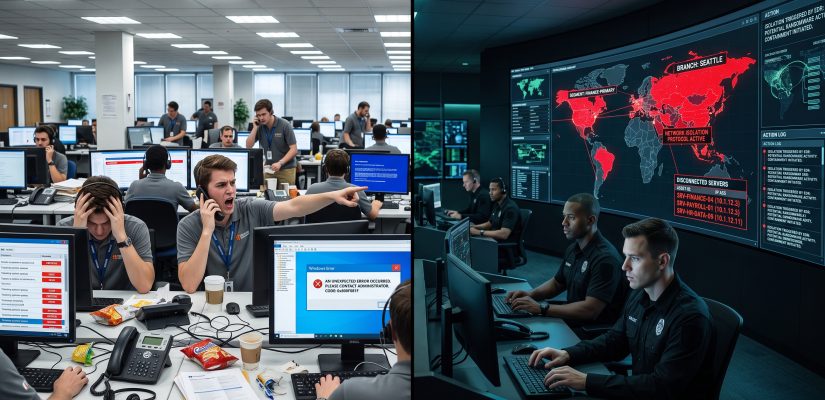
The Helpdesk is Not a SOC: Why Standard IT Fails Under Fire

There is a dangerous and widespread misconception in corporate boardrooms: the belief that a well-staffed, highly competent IT department is inherently equipped to handle a targeted cyberattack. Let me be brutally clear: asking your standard IT helpdesk to fight a professional ransomware syndicate is like asking a commercial airline pilot to fly a fighter jet into combat.
They are both sitting in a cockpit, and they both know how to read the instruments, but the mission, the training, and the survival instincts are entirely different. When a critical infrastructure (KRITIS) environment or a mid-market enterprise goes up in flames, relying on standard IT operations is a guaranteed path to catastrophic failure.
The Fundamental Conflict: Availability vs. Containment
The core of the problem lies in the conflicting directives of the two disciplines. Standard IT operations are deeply rooted in frameworks like ITIL. Their absolute primary directive is Availability. If a service drops, the goal is to restore it as quickly as possible to minimize business disruption.
Security Operations (SecOps), on the other hand, operate under a completely different paradigm. During an active breach, the primary directive is Containment and Preservation. When the network is compromised, you do not want to restore services; you want to isolate them. You accept severe business downtime to prevent a total, destructive overwrite of your digital assets.
If you do not strictly separate these two functions, your own IT team will inadvertently work against you during a crisis.
The Deadly Instinct to Reboot
To understand this conflict, look at the cognitive overload of an IT administrator at 3:00 AM. Alerts are flashing, the Domain Controllers are unreachable, and database servers are dropping offline.
The immediate, ingrained instinct of a standard sysadmin is to troubleshoot. They will attempt to log in, clean up whatever seems to be causing the crash, and reboot the server to get it working again. In a cyber crisis, this instinct is deadly.
Rebooting a compromised system destroys volatile memory (RAM). That RAM contains the cryptographic keys the attackers are currently using, their active command-and-control connections, and the exact forensic artifacts external responders need to determine how the breach occurred. By rebooting a machine to “fix” it, your helpdesk is actively destroying the crime scene and flying blind into the next wave of the attack.
Bureaucracy is a Liability in a Firefight
Standard IT thrives on change management. You test patches, you submit tickets, and you wait for a Change Advisory Board (CAB) to approve firewall modifications. This bureaucracy prevents self-inflicted outages during peacetime.
During a ransomware attack, the attackers are moving at machine speed. If your security team has to wait for a management sign-off to block a malicious IP range or sever the main internet uplink, data is already being exfiltrated. In a firefight, standard ITIL processes must be violently suspended. You do not debate; you execute predefined tactical plays.
Shifting the Command Structure
Organizations must establish a hard, pre-defined line where IT operations end and crisis management begins.
-
The Incident Commander: When a high-severity alert is verified, standard IT steps back. A designated Incident Commander takes absolute, dictatorial control over the infrastructure.
-
The Kill Switch Authority: This commander must have the pre-authorized right to pull the plug on external connections without asking the CEO or convening a board meeting.
-
Tactical Isolation: IT staff is repurposed from “troubleshooters” to “isolators.” Their only job is to physically or logically disconnect assets while keeping them powered on for forensics.
Stop expecting your helpdesk to magically transform into a Security Operations Center under extreme pressure. Separate the duties, write strict playbooks, and train your IT staff on exactly when to stop fixing things and start locking them down.

Recent Comments